
Varukorgen är tom


 Kontorsmaterial
 Böcker
 Lärande & Utbildning
 Skolmaterial


AI Media Generation - Batch Long Videos
 AI Media Generation - Batch Long Videos
Use Batch Long Videos when you want multi-scene long videos for several products. This is the most powerful and most balance-sensitive batch workflow.
Before you start: Batch long videos create multiple jobs per product. Add enough funds and test one product before running a full batch.
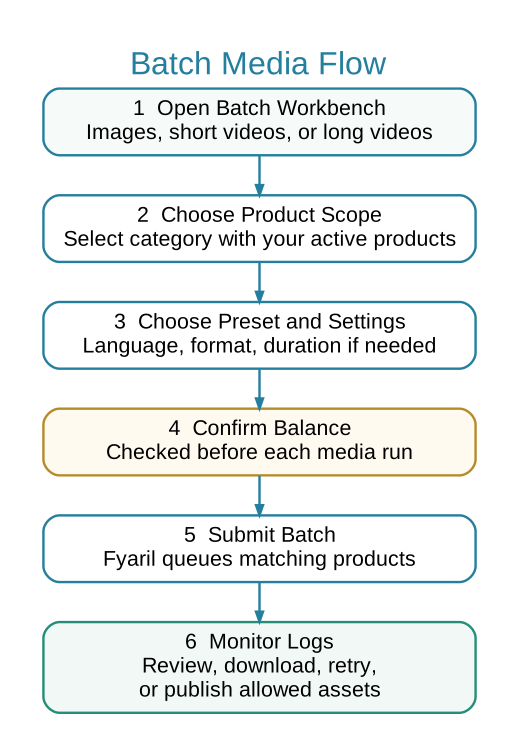
 Batch Media Flow
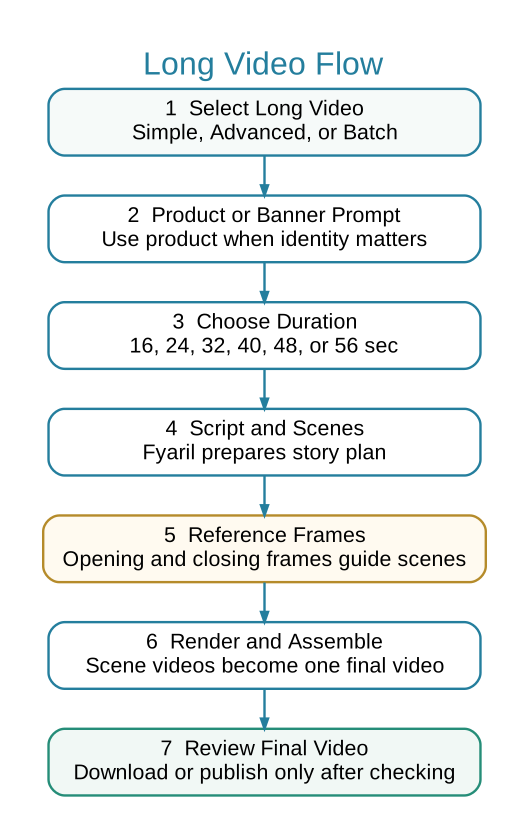
Long Video Sub-Flow
 When to Use Batch Long Videos
- You need long videos for several ready products.
- You have already tested the preset on one product.
- You have enough seller balance for multiple long-video projects.
 Steps
Steps
- Open Marketing > AI Media > Batch Long Videos.
- Select a category containing your active products.
- Choose long video preset and total duration.
- Confirm balance and submit the batch.
- Monitor logs for scripts, reference frames, scene videos, and final assembled videos.
- Review each final assembled video before download or publishing.
Strong Recommendation
Run one Advanced Long Video first with the same preset. If the result is good, then use Batch Long Videos for more products.