


 Office Supplies
 Books
Books
 Learning & Education
 School Supplies


How to Create Product Bundles Offers
Create Product Bundles & Offers
Learn how to create compelling product bundles to increase your average order value, move inventory, and delight your customers.
Why Create Bundles?
Increase Order Value
Encourage customers to buy more items in a single purchase.
Move Inventory
Bundle slow-moving items with popular ones to clear stock.
Delight Customers
Offer curated collections and great deals that customers love.
How to Create a Bundle
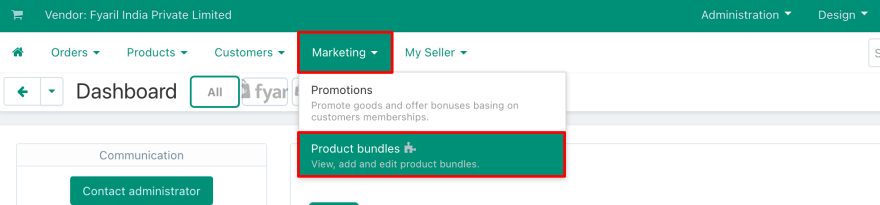
Go to Product Bundles
In your vendor panel, navigate to Marketing > Product Bundles.
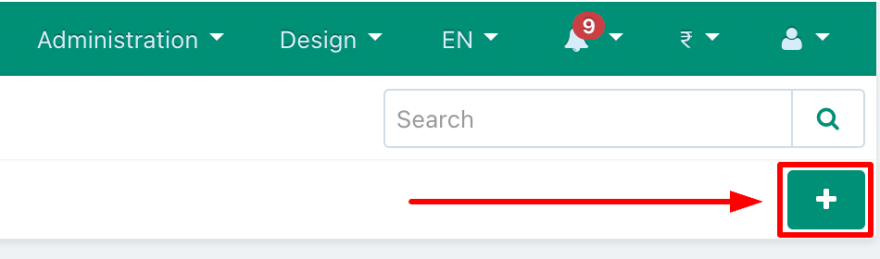
Start a New Bundle
Click the plus (+) icon in the top right corner to open the bundle creation page.
Configure Your Offer
Set up the details of your bundle:
- Fill in the offer name and description in the General tab.
- Go to the Products tab to add the items you want to include.
- Enter the discount value for the bundle.
(This step involves configuring multiple tabs within the editor.)
Create and Launch
Once everything is configured, click the Create button to save and activate your bundle. Your new offer will now be visible on your product pages!
(Look for the "Create" button in the top right of the editor.)
Have Additional Questions?
Contact us through My seller > Message Center, or email us at sellers@fyaril.com.